Path rules
Path rules select which Markdown notes stay in Reading view. Open Settings → Read Only View to add, disable, or remove a rule.
Modes and precedence
With Enabled on, the plugin evaluates a Markdown note in this order:
- An enabled Exclude match leaves it editable.
- Otherwise, All Markdown files protects it.
- Otherwise, Only matched paths requires an enabled Include match to protect it.
New installations start in All Markdown files mode. Include rules are retained but inactive in that mode. In Only matched paths, an empty rule list protects nothing. Changing or deleting rules does not switch modes.
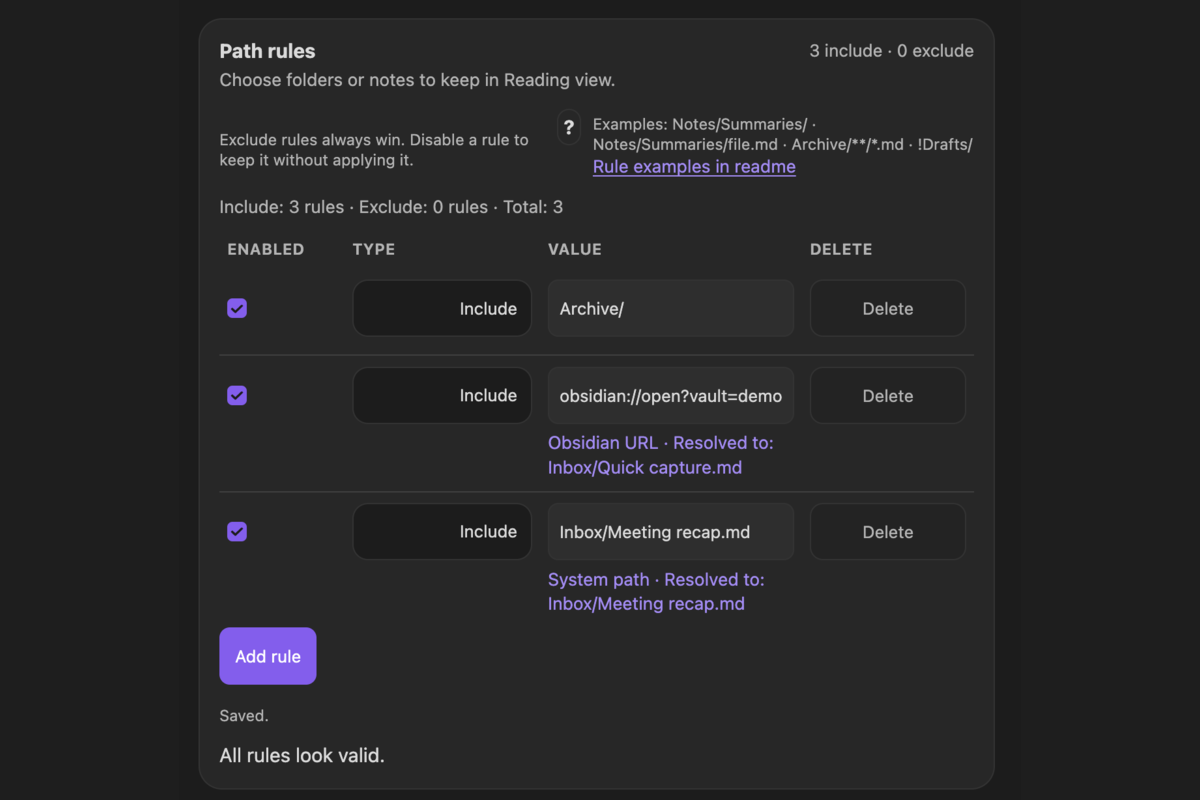
Each row has an Enabled checkbox, an Include or Exclude type, a Value field, and a Delete button. Disable a row to keep it for later without applying it. Disabled and unresolved rules do not participate in matching or active-rule counts.
Ordinary vault paths
By default, Use glob patterns is off and Case sensitive is on. Ordinary rules use literal path-prefix matching.
| Value | Use |
|---|---|
Reference/ | Notes in Reference and all its subfolders |
Archive/ | Notes in Archive and all its subfolders |
Notes/Summaries/ | Notes under this nested folder |
Reference/Handbook.md | A prefix beginning with this note path |
Keep the trailing / for folder rules. In prefix mode, a plain name without .md or wildcards is treated as a folder prefix after source resolution. When entering an existing vault path without an extension, the source resolver first checks for a matching Markdown note; an existing folder is normalized with a trailing slash. Use / explicitly if a note and folder share a name and you intend to select the folder.
A .md vault path remains a prefix rule, not an exact equality check. To target exactly one existing note regardless of prefix or glob mode, import its Obsidian URL or desktop system file path.
Editable exceptions
With Only matched paths, these rules protect reference notes but allow drafts:
| Type | Value |
|---|---|
| Include | Reference/ |
| Exclude | Reference/Drafts/ |
With All Markdown files, an Exclude for Inbox/ leaves that folder editable and protects other Markdown notes. An include rule cannot override an exclude.
Can I use wildcards in Obsidian read-only path rules?
Yes. Turn on Advanced → Matching → Use glob patterns to enable the plugin's glob matcher for ordinary paths. Patterns match the entire vault-relative path.
| Pattern | Meaning |
|---|---|
** | All paths, including vault-root notes; protection still applies only to Markdown |
Reference/*.md | Markdown notes directly inside Reference |
Reference/** | Notes anywhere under Reference |
Reference/**/Summary.md | Summary.md directly inside Reference or deeper below it |
Notes/Summary?.md | One non-slash character after Summary, such as Summary1.md |
* matches zero or more characters except /; ** can cross folder separators; ? matches one character except /. The /**/ form can cover zero or more nested folders. A leading **/README.md requires a slash, so use README.md separately if you also want the vault-root note.
There is no regular-expression, brace-alternative, or character-class syntax. With glob matching off, * and ? are literal characters. Switching matching modes affects ordinary saved path rules, so replace a prefix such as Reference/ with Reference/** when enabling globs.
To protect the whole vault using **, follow Keep all Obsidian notes in Reading view.
Can I make note-path matching case-sensitive?
Yes. Open Settings → Read Only View → Advanced → Matching and turn Case sensitive on. It is enabled by default. Turn it off to ignore uppercase/lowercase differences when matching paths. This is a shared setting for include and exclude rules, not a per-rule option.
With Only matched paths, glob matching off, and an enabled Include Reference/:
| Note path | Case sensitive on | Case sensitive off |
|---|---|---|
Reference/Handbook.md | Read-only | Read-only |
reference/Handbook.md | Editable | Read-only |
This example assumes no other rules match. The setting applies to prefix and glob matching, as well as comparisons against resolved exact-file rules. It does not rename files or make an invalid Obsidian URL or system path resolve: imported sources must still identify an existing item in the current vault. Verify the actual note path with Path tester.
Can I temporarily disable a path rule without deleting it?
Yes. Uncheck Enabled on the rule's row under Path rules. The plugin keeps its value and type, so you can re-enable it later without entering the path again.
To edit a note protected by its own include rule:
- In Only matched paths, find the note's Include row.
- Uncheck that row's Enabled checkbox, leaving the global Enabled toggle on.
- Wait for Saved. and test the note. If it is Editable, switch it into editing and make your changes.
- Check the row's Enabled checkbox again and wait for Saved. to restore that rule.
If another include, such as Reference/ or **, also matches, disabling only the note rule will not make the note editable. Add an Exclude for the note instead. Keep that exclude row saved: enable it when editing and disable it when you want protection back. Disabling a folder include affects every note it was protecting.
In All Markdown files, include rows are already inactive. Use an exclude for a particular note, or use Disable read-only mode and Enable read-only mode to pause and restore protection globally. Neither approach needs you to delete saved paths, and protection does not resume on a timer.
Can I use an Obsidian URL, system path, or vault path in a rule?
Yes. Add an enabled Include under Path rules in Only matched paths, then paste any of the following sources into Value. The field detects the source format. The same source formats also work for Exclude rules:
| Source | Example | Behavior |
|---|---|---|
| Vault path | Reference/Handbook.md | Uses the configured prefix or glob matching |
| Obsidian URL | obsidian://open?vault=MyVault&file=Reference%2FHandbook | Resolves one exact existing Markdown note in the current vault |
| Desktop system path | /Users/name/MyVault/Reference/Handbook.md | Imports one exact existing Markdown note inside the current vault |
| Desktop system folder | /Users/name/MyVault/Reference/ | Imports a folder using ordinary folder matching |
Obsidian URLs may omit .md. Heading and block locators do not change which note is selected. A URL must name the current vault. Absolute system-path imports are available only on desktop, but the saved vault-relative path remains portable to mobile. The full system path is not persisted after successful import.
If a source cannot be resolved, its value remains visible with an explanation, but it does not match anything. Imported sources require existing targets and do not automatically follow later renames.
Verify the result
Wait for Saved., then paste a specific Markdown note path into Path tester. If the result is unexpected, check the selected mode, exclude matches, enabled rows, case sensitivity, and matching mode.
For very large configurations, settings show warnings and ignore rules beyond the limits: at most 200 includes, 300 excludes, and 400 total. Include rules are counted first; exclude rules at the end are trimmed if the total exceeds 400. Prefer a few folder rules where possible and review any limit warnings.